
How to use Morexam for writing evaluation
A step-by-step illustrated guide to choosing a question, submitting your essay, reading your Morexam report, and revising your next draft.
You have finished an English essay. Did you answer the question fully? Do your reasons support your position? Which sentences need attention? Morexam brings scores, criterion feedback, and an in-context essay review together so you can decide what to work on next.
This guide takes you through one complete practice cycle. Bring your own question and English essay, or choose a question from the question bank.
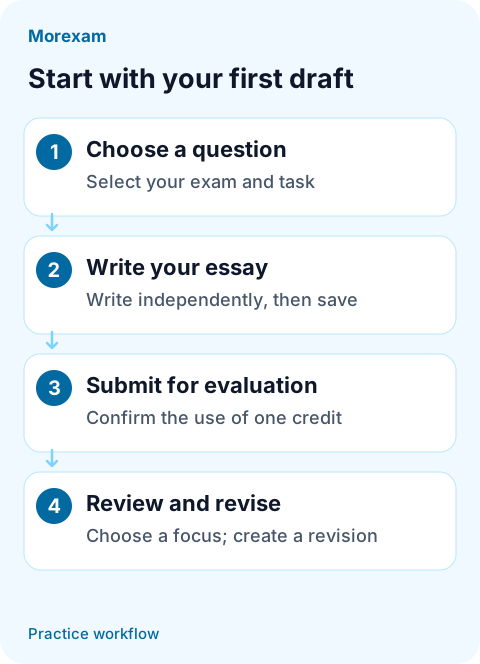
Figure 1. The practice cycle, from a first draft to a revision.
1. Sign in and check your language and credits
Sign in to Morexam and open the writing workspace. If you do not have an account, register first. Once signed in, choose your interface language. The account language at submission is used for that evaluation's feedback; switching languages later does not translate an existing report again.
Creating and saving a draft does not use evaluation credits. Submitting an evaluation requires one credit, so check your available balance before you submit. See the credit plans if you need to review the options.
2. Choose your exam, task, and question
You can start from the question bank, or select Custom Topic in the writing workspace. For a custom question, select the exam and task type, enter the complete English question, and create your writing workspace.
- IELTS: Academic and General Training Task 1 and Task 2.
- PTE: Write Essay.
- TOEFL: Write an Email or Academic Discussion.
Include the instructions and all points you need to address, rather than just an essay title. IELTS Academic Task 1 also requires the question image; make sure its chart and text are readable. The correct task and complete question give the evaluation the context it needs.
3. Write your essay and check that it is saved
Type or paste your own English essay into the editor, keeping its paragraph breaks. Use the timer if you want a timed practice session. Watch the word-count guidance and save status: changes save automatically after you stop typing, and your draft should be saved successfully before submission.
Complete the first draft independently so the feedback reflects your current writing. If the page flags unsupported characters, a word-count issue, or a save error, address the message before continuing.
The platform's submission limits determine what it can accept. They do not replace the recommended target for your chosen task or prove that you have met its exam requirements.
4. Submit for evaluation
Check the question, essay, and save status, then select Submit for Evaluation. Read the credit notice and confirm. Your task will wait in the queue or show as processing; open the report when it is ready.
You do not need to submit repeatedly while you wait. If the task fails, read the reason and the displayed credit outcome before trying again. Credit handling depends on the failure, so do not assume that every failure consumes or returns a credit.
5. Read the report in a useful order
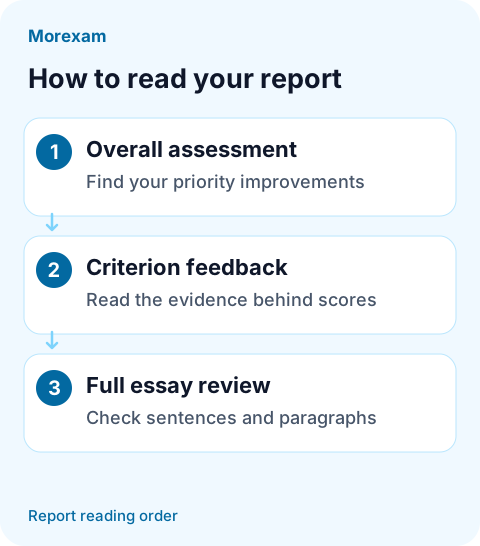
Figure 2. A suggested reading order: identify a priority, then return to your text.
Start with the overall assessment and priority improvements. Find out what your essay achieves and what limits it. Choose one important issue to address first, such as missing part of the question or leaving a claim unexplained.
Read scores together with criterion feedback. IELTS essays receive a score out of 9. PTE Write Essay shows a raw total out of 26. TOEFL tasks receive a score out of 5; their diagnostic criteria use written feedback without separate criterion scores. Use the explanations and evidence to understand the numbers.
Then open the full essay review. Read sentence corrections and paragraph suggestions beside the relevant original text. Understand the reason before making a change. Not every sentence or paragraph needs feedback, and suggestions do not automatically change your saved essay.
These are AI practice estimates, not official exam results. The PTE raw total out of 26 is not the overall exam score on the 10–90 scale. You can explore a sample report before submitting your own essay.
6. Create a revision and apply one clear goal
Create a revision after reading your report. It copies the essay and keeps the same question, while your original essay and report remain available. Make your own changes, then decide whether to submit another evaluation. A new evaluation requires another credit.
For example, if the feedback says an idea needs support, set a concrete goal: “Add a specific situation to paragraph two and explain how it supports the topic sentence.” You can check whether you did that more easily than whether you made the vocabulary sound more advanced.
Before submitting again, check that you answer the question more fully, connect your paragraphs clearly, and resolve the issue you selected. When comparing reports for the same task type, read the written feedback alongside the scores.
Ready to try it? Start a writing practice session.